As promised, I had a little time on Friday to work on the system. In the back of my mind I was thinking I would bring up Ethernet because we are close to the point where we are going to want to control the system from a computer. But I spent the time working out two very different forms of the same basic synchronization vs. visual perception problem.
I started with a little house keeping. Before, the touch screen would only let you drag around a little square, but I changed it so you can scroll through ILDA files and their frames and turn automatic animation playback of a given file on and off.
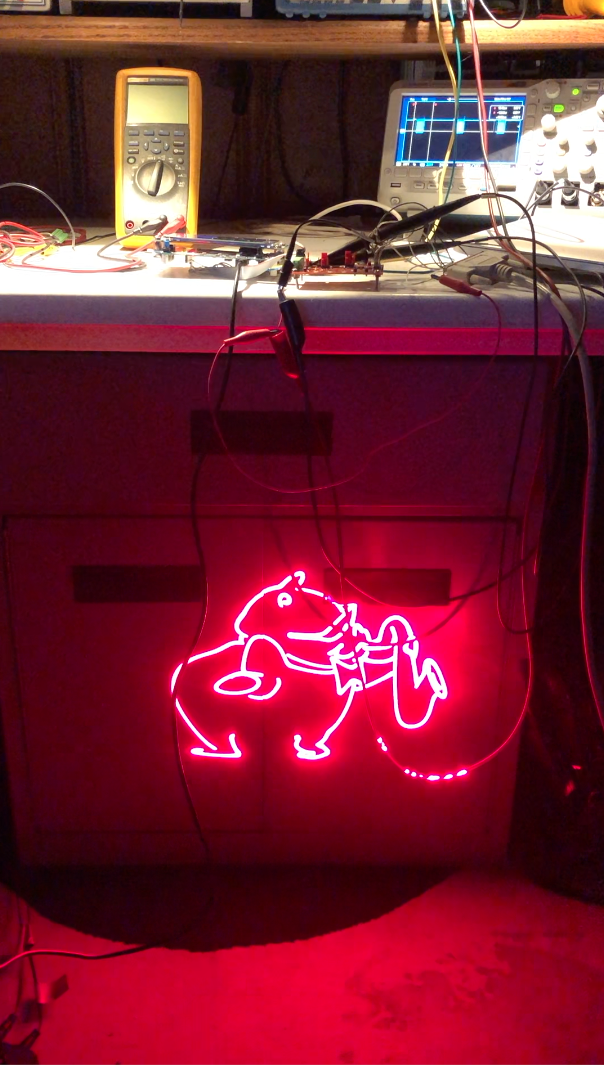
This brought up the first sync issue, which I expected. When manually jumping through frames in response to display taps, or automatically switching frames at a constant time rate, like 10 Hz, visual glitches appear in the laser scanning. This is because we were not yet synchronizing by frame. Imagine we stop at some random point in a frame, which is a visible dot. Then we leap to the blanked dot somewhere else on the screen that starts the next frame of the animation. There is a little ‘tail’ where we can see the laser jumping at it races to the start of the next frame.
For now I fixed this with the basic solution – frames now always finish scanning before we switch to a new frame. This is something we are going to want to do a lot moving forward, like when we are moving or rotating an image on the screen.
When we start using the same scanner for multiple images the problem gets a bit more sophisticated but, for now, this gives us very smooth playback of animations (the rolling shutter doesn’t really do this sax playing pig justice):
This brings up the second sync problem. I expected the frame display on the LCD to be a little flickery. My simple routine turned off a layer on the LTCD controller, cleared the memory to transparent, drew the new frame and updated text, then turned the layer back on. So that last text and image disappeared briefly while the new one is being rendered. But playing frames over and over, we get occasional full on screen glitches as well:
If you view the video above full screen you will see that the text is a little flickery updating but every once in awhile we get a white flash that fills much of the screen. This isn’t related to touch or user interaction. It will happen if we just let an animation play.
We have two onboard peripherals running, the LTDC controller, which is reading two screen size blocks of SDRAM (one for each ‘layer’), and blending them together into a pixel stream for an LCD display, and the DSI peripheral, which converts that pixel stream into a DSI interface compatible data stream. The flashing is because I was not synchronizing turning the layer off and back on with vertical sync. That is, much like we got a glitch when I didn’t completely scan each ILDA frame, we sometimes get a glitch when we turn an LTDC layer off and on in the middle of a LCD frame being displayed.
There is a kludgy way I could have hacked around the flash, but we are rapidly hitting the limits of my simplistic drawing code anyway, so I decided to just bite the bullet and put something more sophisticated in now. There are two common techniques in embedded systems like ours.
One, “partial refresh”, involves splitting the screen into quadrants and updating one part of the screen buffer while another part is being transmitted to the display. This can be a great way to conserve memory, since you can get by with a single display buffer, but it makes rendering a real time task – that is, you are on a fairly strict timeline to get things updated in SDRAM if you want to avoid visible tears and glitches.
Since memory isn’t a problem for us and I’d rather make the graphical interface a “reasonable time task” – something we want to complete fairly quickly, but nothing will glitch or freak out if we get really busy doing something else and fall behind on display once in awhile. So I opted to go with a technique called “Page Flipping”:
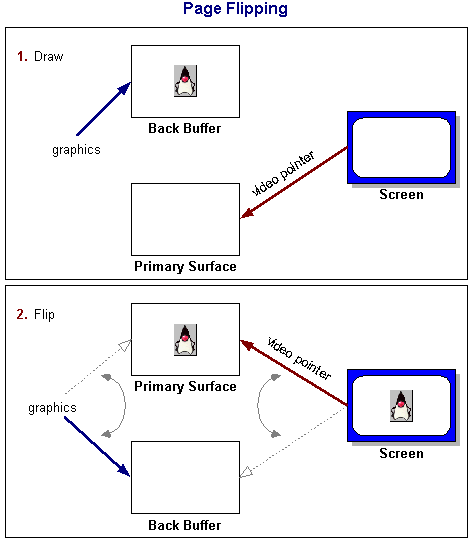
The graphic above is stolen from an Oracle Java Tutorial and it is hopefully pretty self explanatory. I setup two screen buffers. At any point in time, one is for drawing the next thing we want to display, the other is being actively scanned on the LCD. When we are ready to flip, we change the memory pointer for the LTDC layer at line 0 (basically vertical sync). At that point, the buffers’ roles are switched, or ‘flipped’.
Getting two buffers and page flipping setup was pretty quick and straightforward, but that left me without any usable graphics primitives. The samples from ST are all tethered to layers already assigned to the LTDC peripheral. I had to port the functions we’re using to a new module called Graphics.c and change them so they can be directed to any random memory buffer. There is a little additional optimization that I would like to do, but the results are already a pretty significant improvement:
As always, everything is in the git repo. And, yes, just having to know where to tap is a terrible user interface, but we’ll get to that! Next stop, bringing up a network interface…
Leave a Reply